Why Your TDEE Calculator Number Is Wrong (and How to Fix It With Real Data)
5 min read · Updated 2026-07-14
A TDEE calculator gives you a population-average estimate that's often off by a couple hundred calories and drifts as you diet. The fix is to measure instead: log your weight and calories for two to three weeks, then reverse-calculate your real maintenance from how your weight actually responded.
Punch your stats into any TDEE calculator - including ours - and you'll get a number that looks satisfyingly precise. 2,347 calories. Write it down, eat 500 under it, lose a pound a week. That's the promise.
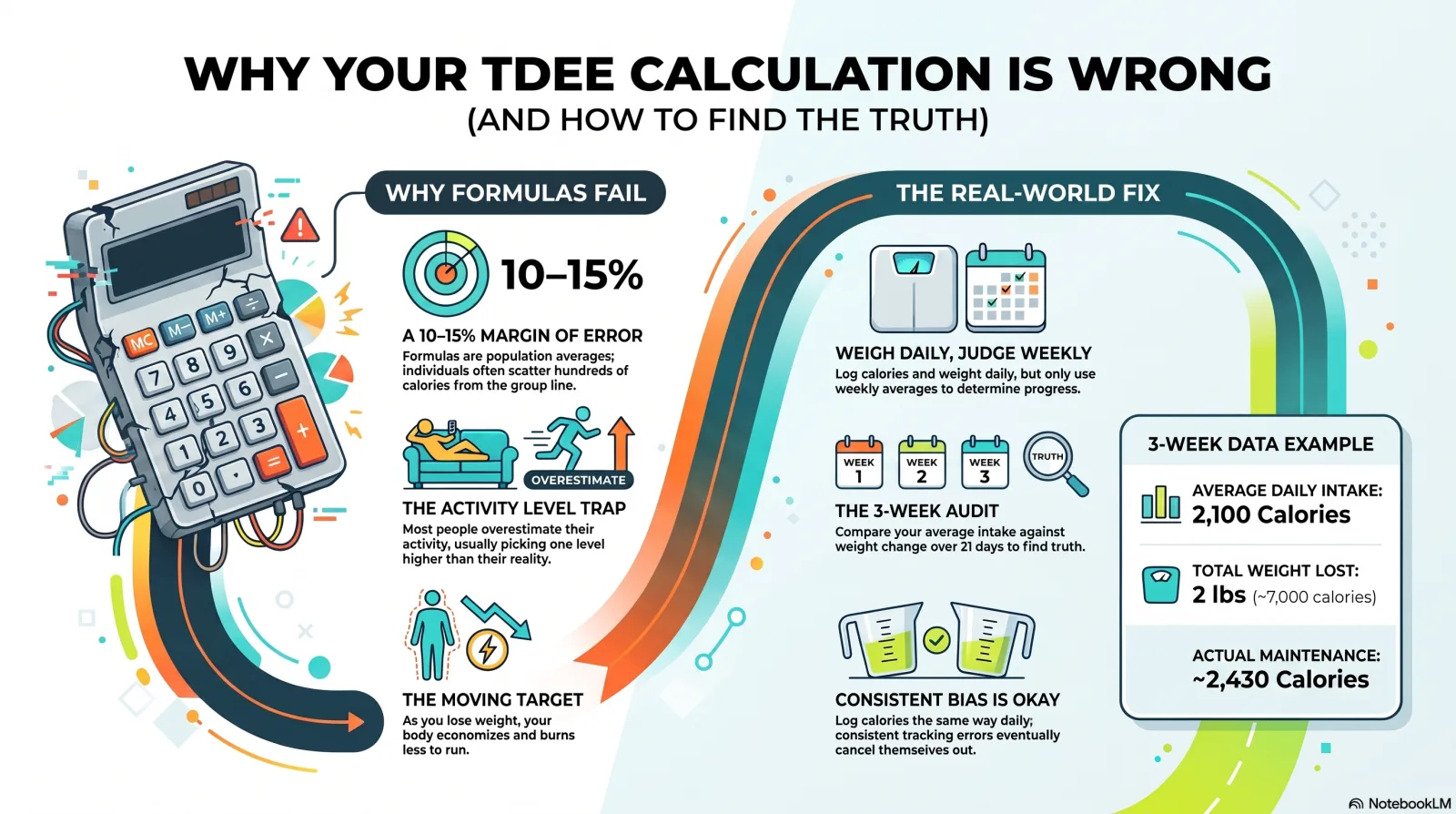
Here's the part the precision hides: that number is a population average wearing a lab coat, and population averages have a habit of not being about you. The formulas behind it were fit to groups of people, and individuals scatter around the group line - commonly by a couple hundred calories in either direction. Two people with identical height, weight, age, and sex can burn meaningfully different amounts just sitting still.
Where the estimate comes from
The big three formulas - Mifflin-St Jeor, Harris-Benedict, and Katch-McArdle - all estimate your basal metabolic rate from body stats, then multiply it by an activity factor you pick yourself. Both steps add error. The formula step assumes your body matches the study population. The activity step asks you to honestly summarize your entire life as one of five adjectives, and almost everyone picks one level too high.
None of this makes the calculators useless. It makes them a starting point - a first guess that's probably within 10-15% of the truth. The problem is treating a first guess like a measurement for months.
The number also refuses to hold still
Even a perfect day-one estimate goes stale. Lose weight and there's less of you to run, so your burn drops. Diet long enough and your body quietly economizes - a little less fidgeting, a little less heat. The 500-calorie deficit you set in January is not the deficit you're actually running in April, which is why progress that started crisp tends to fade while the spreadsheet swears nothing changed. That is what a stall usually turns out to be, rather than a lapse in discipline. It is also why the standard timeline for losing 20 or 50 pounds runs long for most people.
The fix: measure instead of estimate
You already have the two numbers that reveal your real burn rate: what you ate and what you weighed. If you log both for a few weeks, the math runs backwards. Say you averaged 2,100 calories a day for three weeks and lost two pounds - roughly 7,000 stored calories. Your real-world maintenance wasn't whatever the formula said; it was about 2,430. That's not an estimate of people like you. That's you.
This is exactly what HabitSync's observed mode does with your logged weight and calories: it reverse-calculates your real daily burn from how your weight responded, then keeps adjusting as new data comes in - so the forecast tracks your metabolism as it changes instead of the one the formula guessed at on day one.
How to do it, with or without an app
- Start with any formula number - it only has to be roughly right for a few weeks.
- Weigh daily if you can tolerate it, and judge only the weekly average - single days are noise.
- Log calories the same imperfect way every day; consistent bias mostly cancels out in the math.
- After 2-3 weeks, compare average intake against actual weight change and correct your maintenance number.
- Recheck about monthly, since the target moves as your weight does.
The calculator gets you in the neighborhood. Your own data gets you the address.
Keep reading
- How to Tell If a Medication Is Working (and What Else It's Doing) — Many medications take weeks to work, and population side-effect rates say nothing about you. One before/after method answers both questions from your own data.
- Why Just Tracking a Habit Can Start Changing It — Noticing an automatic behavior is often what breaks its grip, before you try to change anything. Here's why logging a habit works even on days you don't act.
- Why Your Habit Tracker and Your Pill Organizer Should Be the Same App — Most people log habits in one app and medications in another. The interesting answers live between those two datasets - and splitting them hides them.
- Never Miss a Dose Without a Single Alarm: The Visibility Method — Reminder apps assume more alarms mean better adherence - until dismissing the alarm becomes the habit. Try routine anchors and visible dose counts instead.
- How Long It Takes to Form a Habit: 18 to 254 Days — The 21-day rule has no study behind it. The research people cite found habit formation took 18 to 254 days, averaging 66. Here's what moves you in that range.
- Does Habit Tracking Work? What the Evidence Says — In an NIH-funded trial of nearly 1,700 people, those keeping daily food records lost twice as much weight. What tracking does, and where it stops helping.
- Why Habits Carry You on Your Worst Days — When willpower runs out, people don't make worse choices - they make more automatic ones. Depletion raised habitual choices 28-32%, good habit or bad.
- Why Old Habits Come Back (and What to Do Instead) — Habits don't get erased. Extinction reversed the neural signature of a rat's habit, then it returned the instant retraining began. What that means for relapse.
- Why Sharing a Streak Isn't the Same as Sharing Progress — Most habit trackers with friends just mirror checkmarks. HabitSync Groups compare the real numbers behind them, and only what you choose to share.
- Why Rigid Habit Trackers Don't Survive Contact With an ADHD Brain — HabitSync wasn't built for ADHD, but flexible goal types, honest miss tracking, and a history that never resets fit where rigid trackers break down.
- How to Find Out What's Actually Affecting Your Sleep and Mood — How to tell a pattern from a coincidence in your own sleep and mood data, and why testing dozens of factors at once needs a correction most apps skip.
- Why the Scale Stopped Moving When Your Diet Didn't — A stall usually means your maintenance calories moved, not that you lost discipline. Here's how to measure where maintenance sits now from your own data.
- What Separates a Medication Tracker From a Reminder App — Most medication apps are reminder apps that log a checkmark. Here's what to look for if you want to answer whether a medication is actually working.
- Some Habits Don't Pay Off the Same Day — Compare today's habit against today's mood and anything with a lag looks useless. Why delayed effects are common, and how to test for them at several delays.
- Sharing Progress Without Sharing Your Weight — Accountability groups usually mean handing over private numbers. Here's a sharing model where every metric is off by default and weight can be percent change.
- What a Mood Tracker App Actually Records — A daily 1-10 rating plus an optional emotion from a 25-square grid. Here is what a mood tracker app records, and what it can tell you afterward.
- How an Accountability App Works Without a Leaderboard — Join with a code, pick what you share per metric, and compare derived progress lines. No leaderboard, and your raw daily logs never leave your account.
- Why Habits Built Around Your Character Strengths Actually Last — Using a signature strength in a new way for one week raised happiness for 6 months in a controlled study. Here's how to point a habit at one.
- One Missed Day Doesn't Erase a Streak. All-or-Nothing Thinking Says It Does. — Dieters who only believed they'd eaten a bigger slice went on to eat more, not less. The same distortion turns one missed habit day into a lost week.
- Why Naming the Urge to Skip a Habit Works Better Than Fighting It — Putting a feeling into words measurably calms the brain's threat response. Smokers who practiced it cut cigarette use 26% without the urge itself weakening.
- Which App Should You Use to Track 75 Hard, 75 Soft, or Exodus 90? — 75 Hard, 75 Soft, and Exodus 90 all come with an official app built for that one program. Here's when a flexible tracker fits better, and when it doesn't.
- Group Habit Challenges: Spiritual Fitness, Habit Stacking, and Mastermind Formats — Spiritual fitness challenges, habit stacking, trinity challenges, and masterminds share one mechanic: habits tracked together. Here's how to set one up.
- Can You Trust the 'Insights' Your Habit Tracker Shows You? — We ran our own correlation engine on pure random data and it found 24 fake patterns, some labeled 'strong.' Here's the statistics that get it to zero.
- Why Most Habit Stacking Apps Don't Actually Stack Anything — Most habit stacking apps just let you list habits. Real stacking chains a new one onto a routine you already run, then tracks the chain, not each habit alone.
- Does Alcohol Affect Sleep? What Two Reviews Found, and How to Check Your Own Nights — About two drinks is enough to delay and cut REM sleep, and falling asleep faster only showed up near five. What two reviews found, and how to check your nights.
If you want to see this in the app, here is the HabitSync calorie calculator.